
The iPhone to-do app
A clean list every morning.
What you take on for today counts. At 3 a.m. everything resets: what you finished is filed away, what you didn't moves to the archive instead of piling up. In the morning you decide again what really matters today.

Free. No subscription, no ads, no account.
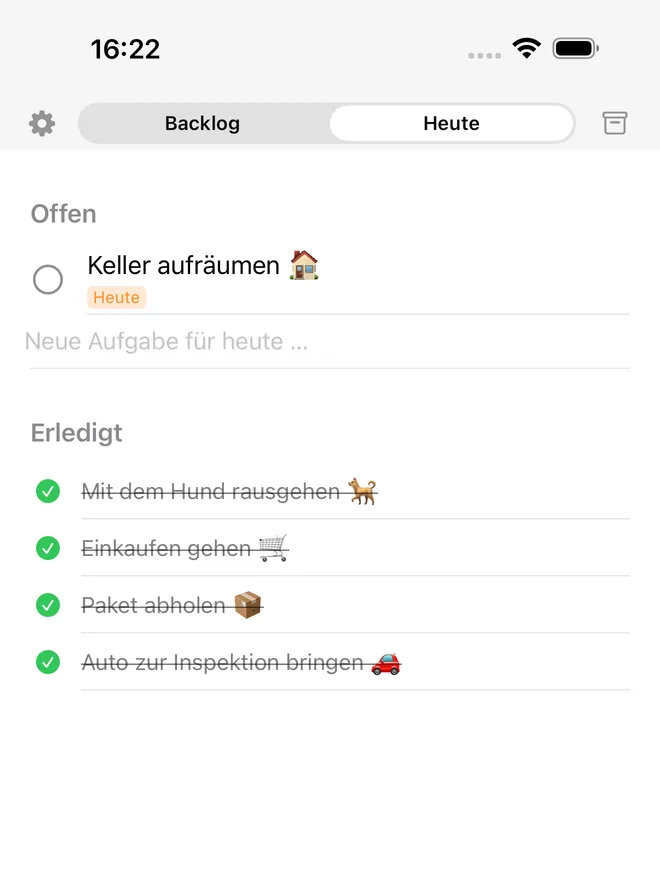
A day in Dawny
Three lists, one philosophy.
What's on Today counts today. Nothing else.
Backlog
- Plan a trip ☀️
- Renew passport
–
Today
–
Archive
Completed
- Pick up prescription
–
Archived
- Buy tickets 🎟️
–
Next morning: Today is empty again. You decide anew.
FAQ
The reset
What happens at 3 AM, and why.
What exactly happens at three in the morning?
Dawny closes out the day and empties the Today list. Tasks you finished end up in the Archive under “Completed”. Unfinished ones go to the Archive too by default, under “Archived”. Recurring tasks return to the Backlog. The app does not need to be open for any of this.
Why three in the morning and not midnight?
Because a day does not end at twelve, it ends when you go to sleep. If you check something off at half past midnight, you want to see it in yesterday's Today, not in today's tomorrow.
Can I change the time?
Yes. In Settings you can set the reset to any full hour. Three in the morning is just the default.
What happens to tasks I did not get done?
They are not quietly pushed to tomorrow. By default they move to the Archive, because a spot on the Today list is a commitment and not a filing cabinet. A swipe right brings them back from there, either to the Backlog or straight to Today.
Are my completed tasks gone afterwards?
No. They sit in the Archive under “Completed”, sorted by date. You can look up at any time what you got done on a particular day.
How do I know what happened overnight?
The first time you open the app after a reset, Dawny shows a short two-step summary: first what was filed away from Today, then what was tidied out of the Backlog. After that you are up to date and the summary disappears.
The three lists
Backlog
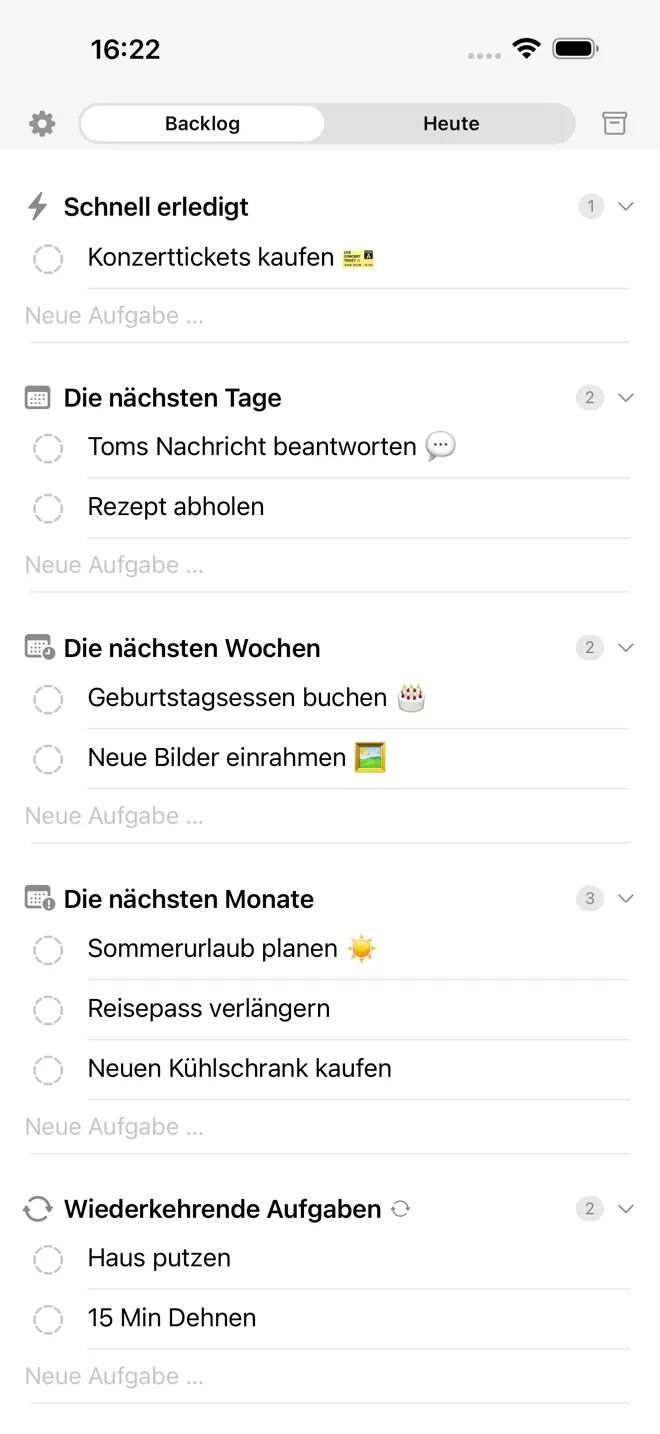
Sorted by time horizon, not by priority
Priorities are a lie you tell yourself. In the end everything is important. So Dawny asks something simpler: roughly when?
- Quick for everything that takes a few minutes
- Next couple of days for what is due this week
- Next couple of weeks and Next couple of months for the rest
- Someday for everything without a horizon
- your own categories, as many as you like, each with its own symbol
- recurring categories as a special case
Each morning you pull what you trust yourself to do from any of these groups over to Today. The rest stays visible without getting in the way.
Today
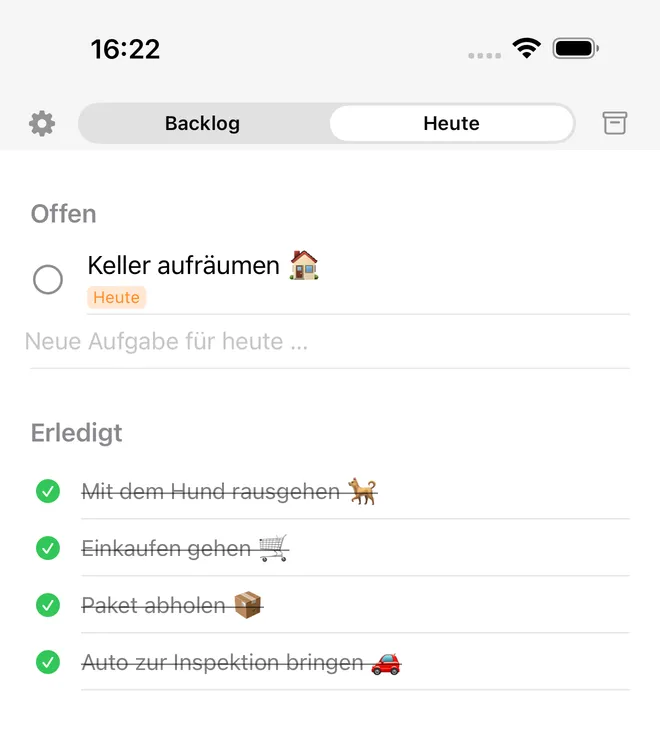
Today is deliberately short
Two sections, nothing else: Open and Completed. No projects, no tags, no subtasks, no colours telling you how bad you should feel.
You write a task straight into the line below. One tap ticks it off. To move a task from the Backlog to Today, swipe right.
Archive
The Archive is not a trash can
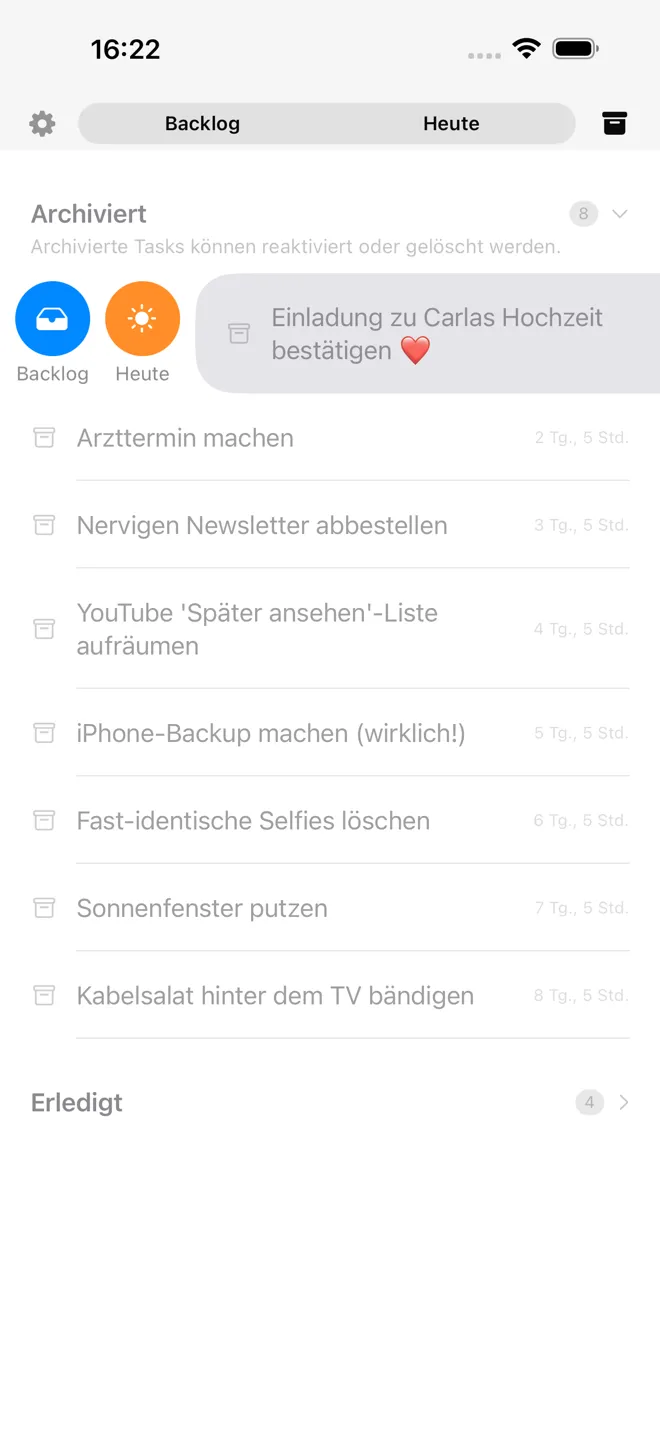
Two things sit side by side in the Archive: under Completed, everything you managed, sorted by date. Under Archived, everything that was left undone. None of it is deleted.
Swipe right to bring a task back, either to the Backlog or straight to Today. If you open the app in the morning after the reset, you first get a short overview of what was filed away overnight.
FAQ
Getting the most out of Dawny
The gestures worth seeing once, and how to plan a day with them.
The gestures
How do I move a task from the Backlog to Today?
Swipe the row right. An orange sun labelled “Today” appears and the task moves over. Swipe far enough and you do not even need to tap.
How do I check a task off?
In the Today tab, tap the circle to the left of the task and it slides down to the completed tasks. This only works in Today, on purpose: the circle in the Backlog is greyed out for the same reason, since checking things off is deliberately tied to the Today list. If you would rather not see completed tasks there, you can hide that section in Settings.
How do I create a new task?
In Today and in the Backlog there is always an empty row below the list. Tap into it, start typing, and Return creates the task so you can type the next one right away. For the Backlog you pick the category it should go into first.
How do I get something back out of the Archive?
Swipe the row in the Archive right. You get two targets: “Backlog” puts it back into storage, “Today” puts it on your plate for today. A swipe left deletes it for good.
How do I move a task into a different category?
Press and hold the row in the Backlog and a list of all categories appears. Pick the one you want, and the task moves there right away.
Can I create my own categories?
Yes, as many as you like, each with its own name and symbol. There is a dedicated row for it at the end of the category list in the Backlog.
What are recurring categories?
A category can be marked as recurring. Nothing in it is ever archived, it goes back to the Backlog overnight whether you finished it or not. Exactly right for workouts, watering plants or vocabulary.
Planning a day
How many tasks belong in Today?
As many as you genuinely trust yourself to do on this one day. For most people that is three to five. The list is deliberately short so that you still look at it in the evening instead of swiping it away.
When is the best time to plan?
In the morning, in a minute. You go through the Backlog from top to bottom, pull out what is due today, and close the app again. The reset has already cleared the list for you.
What do I do with tasks I keep postponing?
When a task lands in the Archive for the third time, that is already the answer: the way you planned it, it is apparently not going to happen. Our suggestion: either let it go. Or, if it really matters to you, ask yourself what you are missing to actually get it done tomorrow, and make that the next task.
I have a big undertaking that will take weeks. How do I model that?
Dawny is deliberately not the right tool for that: a to-do list is not project management software. Plan bigger undertakings in an app built for that instead. What can help inside Dawny: a recurring task like “Keep working on the project”, which shows up every day regardless of how far you have gotten.
Why Dawny works this way
A to-do list should not catch you out.
Most lists grow. Whatever you don't manage today is there again tomorrow, and the day after too, just with a red dot next to it. After two weeks the list is a record of everything you missed and you stop opening it.
Dawny turns that around. A spot on the Today list is a commitment for that one day. If you don't keep it, the day is over and the task moves to the Archive, without reproach and without a red dot. It isn't gone, it is just no longer in the way.
Whatever really matters, you bring back. Whatever you don't bring back three times over wasn't it.
FAQ
The idea behind it
The questions that come up when Dawny behaves differently than expected.
Why can't I check anything off in the Backlog?
Because finishing things happens in Today. The Backlog is a collection of everything that is coming up at some point, not the list you are working on right now. That is why the circle is visible but greyed out. Swipe the task over to Today and you can check it off.
Why are unfinished tasks archived at all?
Because a list that only grows eventually stops being read. If leftovers simply stay put, every look at the list costs you energy for things you wrote off long ago. Dawny clears them away and leaves the decision to you whether to bring them back.
It bothers me that tasks are archived on the very first try. What can I do?
That is adjustable. In Settings there is a number from 1 to 7 under “Make it count”. It says how often a task may sit unfinished in Today before it goes to the Archive. At 3 it returns to the Backlog twice and only moves to the Archive on the third time.
Why can't I give a task a priority?
Because priorities are a lie you tell yourself. After two weeks everything is “high”. Dawny asks the simpler question instead: roughly when? That is where the time horizons in the Backlog come from. The real prioritising happens every morning when you decide what moves to Today.
Why are there no due dates and no reminders?
Because a date in the future defers a decision instead of making it. Dawny has exactly two points in time: today and someday. If you need a task at a fixed moment, it belongs in your calendar or in Apple Reminders, and Dawny can mirror it there.
Why no projects, tags or subtasks?
Because every extra bit of structure is an extra decision you make before you have finished anything. Dawny has one level: a task, in a category. If you need more structure, create more categories.
Is an archived task lost?
No. Archived means filed, not deleted. The Archive is searchable and sorted by date, and a swipe brings any task back. The only things that get deleted are the ones you delete yourself.
Why did a task disappear from the Backlog even though it was never in Today?
The Backlog tidies itself too. Every category has a lifespan: “Quick” seven days, “Next couple of days” 21, “Next couple of weeks” 60, “Next couple of months” a year. Anything left untouched for longer moves to the Archive. “Someday” has no limit, everything stays there, and recurring categories are exempt. For your own categories you set the limit yourself.
Devices
Widgets
On the home screen, without opening the app
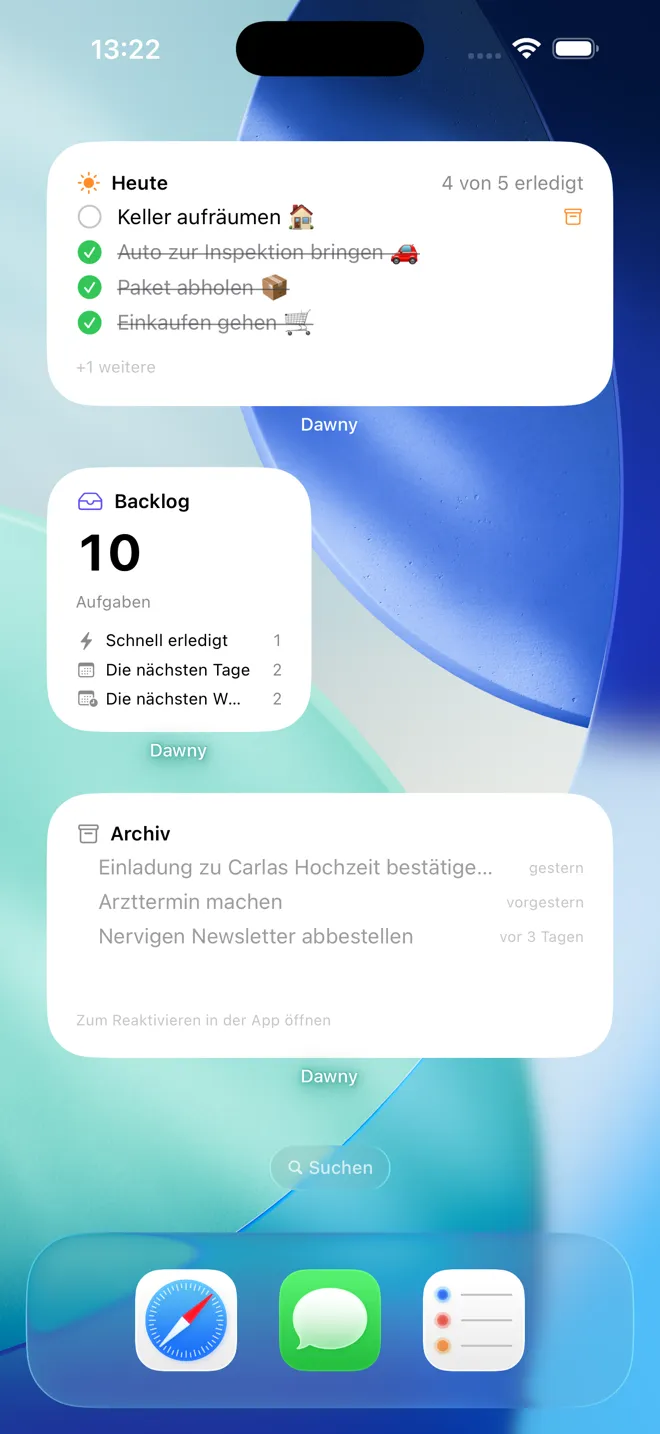
Three widgets in several sizes: Today, Backlog and Archive. Tasks can be ticked off right in the widget, the app doesn't have to launch for that.
Tapping a line jumps to the matching place in the app. The nightly reset applies to the widgets just the same.
-
Sync with Reminders
If you want, you can mirror the Today list into Apple Reminders. That way your tasks also show up on Mac, iPad and Apple Watch.
-
iCloud sync, optional
Turn it on and your iPhone and iPad stay in step, through your own iCloud account, with no outside server.
-
Shortcuts and Siri
Create tasks by voice or from an automation, straight into the Backlog or to Today.
-
Three widgets
Today, Backlog and Archive, in several sizes. You can tick things off right in the widget, without opening the app.
FAQ
Devices, sync and widgets
What reaches your other devices, and what does not.
What can the widgets do?
There are three, in several sizes: Today, Backlog and Archive. Tasks can be checked off right in the widget without launching the app. Tapping a row jumps to the matching spot in the app. The nightly reset applies to the widgets just the same.
Does Dawny run on iPad or Mac?
Dawny is built as an iPhone app. On the iPad it runs in iPhone compatibility mode, in the iPhone-sized layout rather than a dedicated iPad interface. It does not run on the Mac. If you want your tasks on Mac or Apple Watch too, turn on the sync with Apple Reminders.
How does the sync with Apple Reminders work?
You switch it on in Settings and link a list. Dawny writes your Today tasks there and reads changes back from there. The first time, iOS asks for permission.
Can I import my existing reminders into Dawny?
No, and that is on purpose. The point of Dawny is that you decide fresh every morning what counts today. A list with 200 imported leftovers would be the opposite of that.
What does the iCloud sync do?
It keeps two devices with the same Apple ID in step, through your own iCloud account. There is no server on my end. The sync is off by default and only takes effect after you restart the app.
What can Siri do?
You can create tasks by voice, either in the Backlog or straight into Today, and say the category along with it. Dawny registers with the system through App Intents, so the Shortcuts app finds the actions automatically.
What happens if I don't touch my iPhone for days?
Nothing is lost. The next time you launch the app, the reset catches up on everything that was due in the meantime, and the summary shows you what was filed away.
Free, no account
- Free No subscription, no pro version, no in-app purchases.
- No account No registration, no login, no email address.
- Open source The app is on GitHub under the MIT license.
The app collects nothing. On this website I measure reach anonymously, without cookies. More on that in the privacy policy.
FAQ
Data, cost, support
Who owns what, and what it costs.
Does Dawny cost anything?
No. The app is completely free. There is no subscription, no pro version, no in-app purchases and no ads. There is also no feature sitting behind a paywall.
What's the catch?
There isn't one. Dawny started as a tool I use myself. The source code is public on GitHub, so you can check what the app does.
Do I need an account?
No. You download the app and get going. There is no sign-up, no login, and I do not know your email address.
Where are my tasks stored?
On your iPhone. If you turn on the iCloud sync, additionally in your own iCloud account, which Apple manages. Either way I have no access to them, because there is no server of mine.
Does the app collect data about me?
No. The app contains no analytics SDKs, no crash reporting to me, no advertising IDs and no trackers. On this website I measure reach anonymously, without cookies and without recognising you. The details are in the privacy policy.
How do I get rid of all my data again?
Delete the app. That removes all local data. Whatever you mirrored into Apple Reminders stays there and has to be deleted there if you want it gone.
I found a bug or have a request. Where do I send it?
Write to me at info@dawnyapp.com. You will also find a direct way there under Settings in the app. Bug reports and requests both land with me personally, there is no ticket system in between.

Tomorrow morning the list is empty. What will you put on it?
Free, no account.